
If you're a high school or college student, your iPhone can make a great tool not only for learning, but for keeping track of courses, assignments, and projects. Whether you're in high school or university, the App Store is full of apps to help you succeed academically, and homework planners are no exception. iStudiez Pro, Erudio, and iHomework all offer ways to help you get and stay organized. But which one is best for you?
iStudiez Pro vs. Erudio vs. iHomework: User interface

iStudiez Pro consists of four main sections, Today, Calendar, Assignments, and Planner. The Today tab gives you a look at not only any assignments, quizzes, or projects you have due within iStudiez Pro but a look at your Calendar app appointments and entries as well. It provides a nice way to see everything all in once place instead of trying to coordinate between two apps. You can tap into anything on the Today screen including events from your regular Calendar app to get more info.
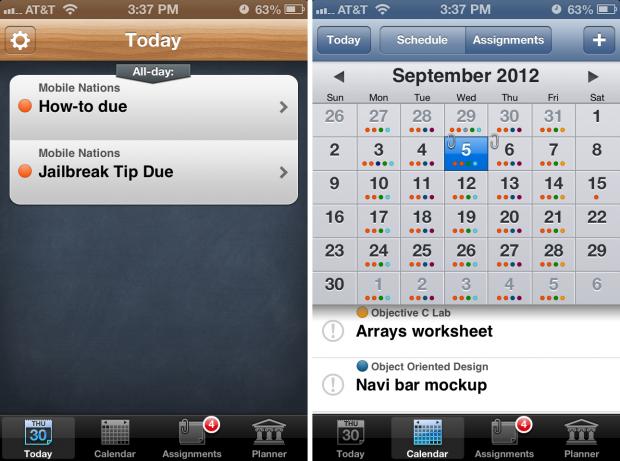
The Calendar tab is similar to the Today tab but gives you an entire calendar view of what you have coming up as a combined view between anything you have entered in your regular Calendar app and in iStudiez Pro. You can edit the way things show up on the calendar by changing the formatting options in the Settings section of iStudiez Pro.
Along the top of the Calendar view you'll see an option to toggle between Schedule and Assignments. The schedule view will give you a list of what you have going for the day as far as classes and other events in your calendar. Toggling to the assignments tab gives you a detailed view of what assignments you have due for that day. The calendar will also show a small paperclip on any day that an assignment is due.

The Assignments tab does exactly what you'd expect it to do, show your assignments all in one place. You can sort things in a few different ways including by due date, course, and priority. Above that you can toggle between current and completed assignments. To bulk delete just tap the arrow button in the upper left and choose the assignments you want to delete, copy, or paste. The copy paste function is nice for assignments that are recurring instead of entering them new every time.
The planner section has three tabs along the top that allow you to view semesters, holidays, and instructors. You can tap into any section and add new data using the "+" icon located in the upper right hand corner. From the semesters tab you can tap into semester to view all the courses you have that semester. Viewing all courses will also bring up grids next to each class showing the days and times you have class. Tapping into individual courses shows the same grid but adds a toggle along the bottom to view assignments for that course as well.
From the main Today screen you can tap into Settings for iStudiez Pro at the top left. Here you have options to edit alerts, change formatting for the calendar, set up syncing, enable/disable grading, and more.
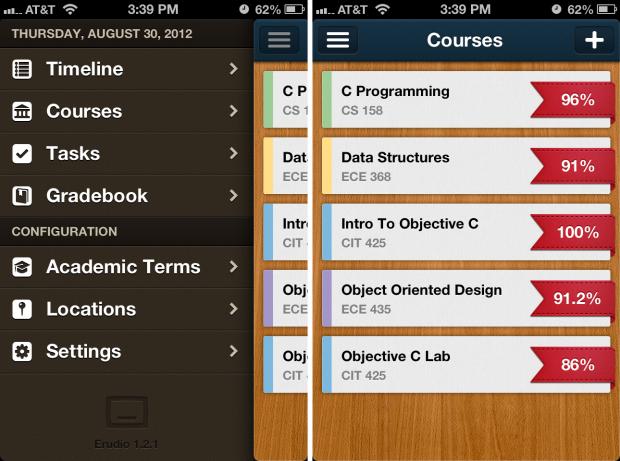
Erudio treats courses, assignments, and grading differently than iStudiez Pro. Upon launching the app you'll see a gorgeous main screeen with a list of your courses. Tapping into any one of them will give you an overview of that course with information such as the course name, section time, dates and times for that class, current tasks, and completed tasks.
From inside an individual course screen you can also add tasks, mark them as complete, and switch between general task view mode and a view that shows when the assignment is due. Toggling the check mark box at the bottom of this screen will show and hide completed tasks.
From the main Courses screen you can tap the menu icon in the upper left hand corner to see a slide out navigation menu. You'll spend most of your time in this panel. The menu items consist of Timeline, Courses, Tasks, and Gradebook. Underneath these items you've got configuration options for academic terms, locations, and settings.
Before starting to enter assignments and courses you'll need to set up an academic term. After that you can add courses before finally starting to add assignments and projects. The one issue I have with Erudio is that you must enter a section number in order to add a course. It's frustrating and honestly, probably not necessary. Most high schools do not institute course numbers, only colleges. If you're in high school you can, however, just make up a section number.
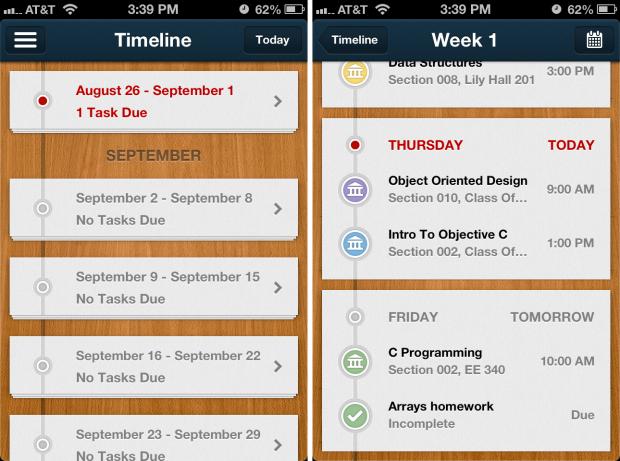
The first Timeline tab will show a list of what you have due based on a week view that is divided into subsections for each month. Tapping into a week will allow you to view all the tasks you have due combined with your schedule for that week.
The tasks section does exactly what you'd expect it to do, show all the tasks you have listed for all classes. You can further sort them by course or by due date. You aren't required to assign a due date if you don't want to. The last section is the Gradebook feature. This will give you a list view of all the classes you have set up in Erudio as well as an overall grade. Erudio takes an average of all the assgnments you've input grades for and gives you a percentage for that course.
The settings tab doesn't have too much to configure but you can choose to sync with iCloud or enable Calendar sync which adds all your tasks in Erudio into your stock Calendar app.
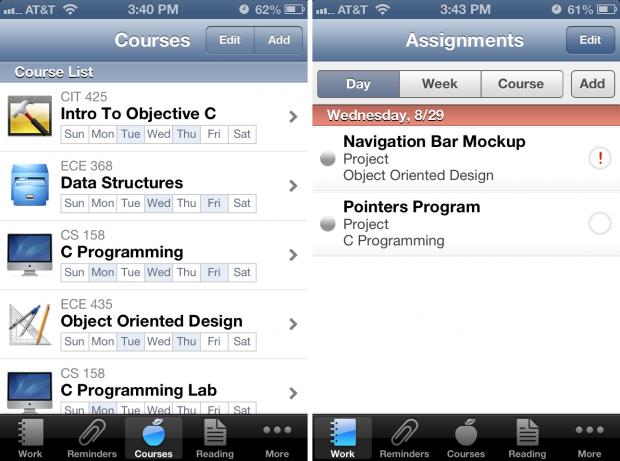
iHomework's layout is more simliar to that of iStudiez Pro and utilizes a main row of icons along the bottom that allows access to all your main functions. By default the tabs along the bottom consist of Work, Reminders, Courses, Teachers, and More. You can tap into the More section and then tap the edit button in the top right corner in order to re-order tabs and drag them around in any order you want. You can change the tabs along the bottom or replace them with other options such as Reading, Completed, Calendar, Types, Sync, and Settings. This gives you more flexibility and customization which will be welcome by many users.
The Work section will show a summary of everything you have assignment wise. iHomework allows you to sort work by day, week, and course. The next section which is Reminders is a place to list things you need to remember to do but aren't technically assignments. Perhaps you need to remember to pick up some books at the book store or buy a new graphing calculator. Reminders is the perfect place to put tasks like these. You can choose to set a reminder but you don't have to for things that aren't time sensitive.
The Courses section in iHomework will show a view of all your courses with the icon you picked to represent that course. Underneath the course title and number you will see a grid showing which days you have that course. Tapping into a course shows the time, date, teachers list, locations, and any other information you've added for that course. You can also toggle along the bottom between course details, assignments, and grading.

The Reading section is unique to iHomework and worth mentioning. You can add all your course books, icons for them, and then add reading assignments that will aggregate into the Reading section. Once in a reading assignment you can use the page marker feature at the top that looks like a curled page to mark what page you're on. If you're like me and hate curled and crimped book pages, this is a super nice feature. You can also tack on assignments, what pages you need to read, and any bookmarks related to that reading assignment as well.
The other tabs for iHomework are Settings and Sync. Settings allows you to edit icon badges, import or migrate iHomework data, and change sort and other preferences for assignments and reminders.
When it comes to user interface, Erudio has the most appealing interface but iHomework has the most useable and customizable interface. It'll really depend on which is more important to you. From a productivity standpoint, iHomework wins.
iStudiez Pro vs. Erudio vs. iHomework: Adding terms and courses

iStudiez Pro allows you to easily add your terms and courses via the Planner section. Once inside the planner, make sure the Semesters tab is selected at the top and then click the "+" symbol in order to add a semester. You can name it whatever you like and then define the date range. After you're done you can go into a term and add your courses. You can also add holidays and instructors in the same manner.
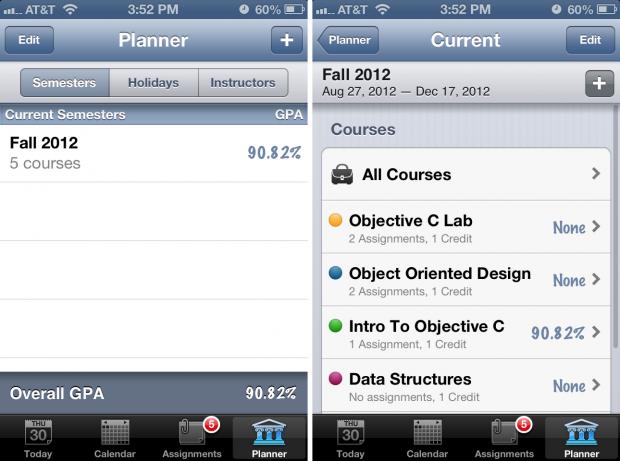
Once you're inside a term you can click the "+" sign next to the term in order to add more courses. You'll be required to enter a course name and next to it you can pick a color label to assign it. Tapping the Add Class button under the Schedule section allows you to set up times and dates. You can choose between a regular repeating course or a single class. If you choose repeating you'll be asked to put days of the week and meeting times that will repeat each week. If you choose single course you can just assign a date and time to it. If you have a list of exam dates, you can quickly add them from this screen as well. Tapping into any course will then allow you to start adding assignments and other options.
Erudio requires all course information to be entered before you'll be able to start entering assignments. And before you start setting up courses you'll have to pick a term. Tapping on the Academic Terms option under the Configuration section allows you to do this. Just like iStudiez Pro, you can choose time frames for academic terms and give them a short name. Once this is done you can tap into that term and add holidays as well.
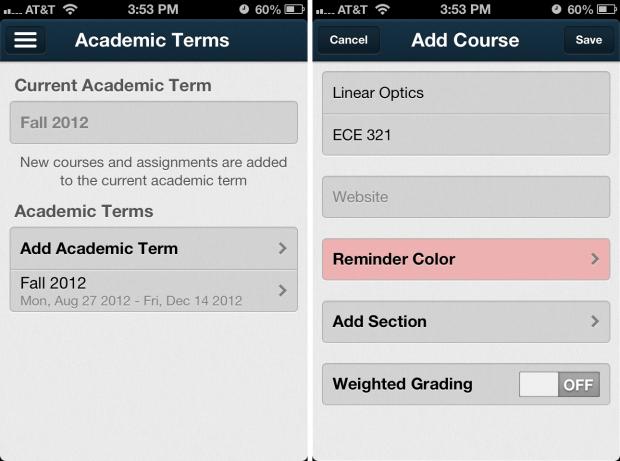
Returning to the main screen you are now good to go in Erudio to start adding courses. Under the Courses section, just tap the "+" sign in the upper right hand corner to start adding course information. You can give the course a short name and a number. You can add in a website if that course has one for resources as well as set a reminder color. The one thing that really irritates me with Erudio is that you are required to include a section number. Considering you're the only one using the app I'm not sure why this is a must have field. It's nice that they offer it but it shouldn't be required. This alienates high school students and anyone who doesn't have section numbers. You can add a place holder in the event that you don't know or have a section number. Putting a placeholder like 1234 will let you proceed. You can also use this area to turn on and off weighted grading.
Once you've added your courses and returned to the main menu of courses in Erudio you can now start adding assignments and tasks under each course.
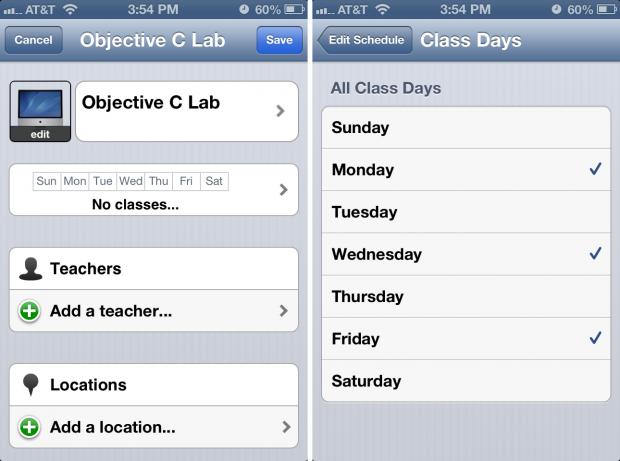
iHomework has a courses tab along the bottom menu that allows you to easily get a quick view of all the courses you have set up. You aren't required to set up acadmic terms or any other information. You actually don't have an option for terms so if that's important to you and you'd like to have past data stored, you may not like the lack of this feature in iHomework.
To add a course just tap the Add button in the upper right corner. You can name the course and assign times and dates as well as teachers and locations. Locations can use either GPS or you can manually enter the information. Tapping the icon for course will also give you the option of assigning one of many pre-designed icons to it. At the very bottom you can add a course website.
Once you've added all your courses into iHomework you're ready to start entering assignments and tasks.
When it comes to adding courses and terms, Erudio is the most complicated due to the need for section numbers. iStudiez Pro and iHomework are very simliar in format but iHomework doesn't have a terms feature. iStudiez Pro offers the best balance between ease of use and feature set when it comes to adding and managing academic terms and individual courses.
iStudiez Pro vs. Erudio vs. iHomework: Managing homework, projects, and reminders

iStudiez Pro allows you to add items not only from the Assignments section but the Calendar and Planner sections too. Once you've chosen to add an assignment you can give it a name, choose a due date, choose a notification time, and add a partner. You can change default notifications for assignments, exams, and classes within Settings or you can go with the defaults which are on the due dates or a few minutes before the course starts.
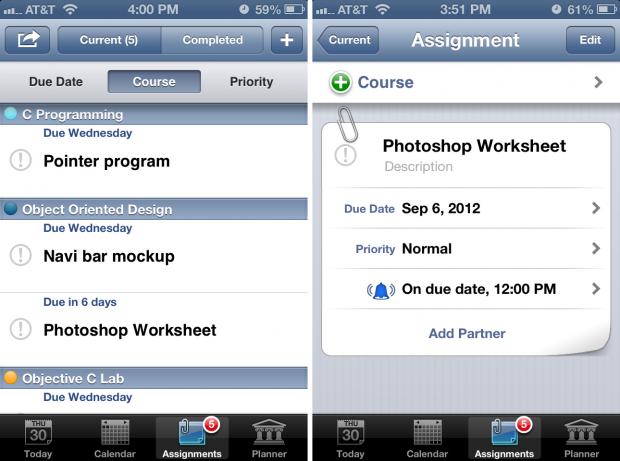
Partners will allow you to add someone from your contacts or a new person to an assignment. This is a nice feature for group projects as it gives you easy access to their contact information from directly within the app. Just open the assignment and click on the partner you need to contact and you'll be taken directly to their contact card in your Phone app. Once you're done with an assignment and have a grade to input, you can mark the assginment as done and a grading option will pop up as long as you have grading enabled under settings. You can enter a total number of possible points and the number you earned. iStudiez Pro will automatically give you the calculation in terms of percentage.
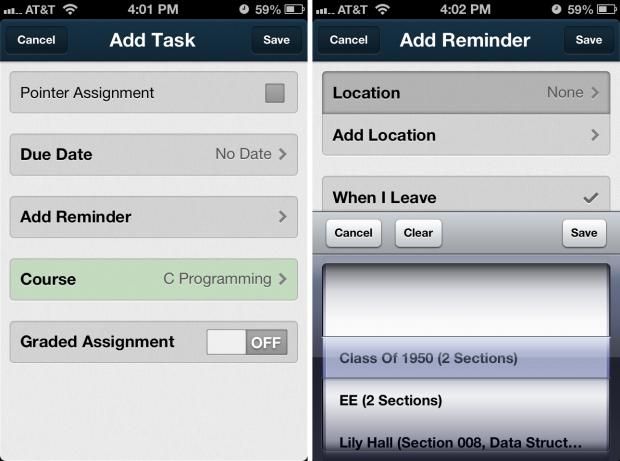
Erudio allows you to add an assignment or task from within any course or the Tasks menu. To add one just give it a name, choose the due date (you don't have to put one if you don't want to), choose a reminder and the course it goes with, and whether or not the assignment is graded. Once you receive a grade you can pop back in and enter what you earned and just like iStudiez Pro and it'll automatically calculate the percentages for you.
Once nice thing that Erudio offers is repeat tasks under reminders. You can choose a repeat for every hour, day, week, month, or year. You can also choose to use location based reminders by ticking location instead of time along the bottom of the reminders menu. You can have the app use a list of places you've already set up or add a location. You can then choose to have the app remind you when you leave or when you arrive at a specific place. Erudio is the only app that offers location based reminders for assignments and tasks.
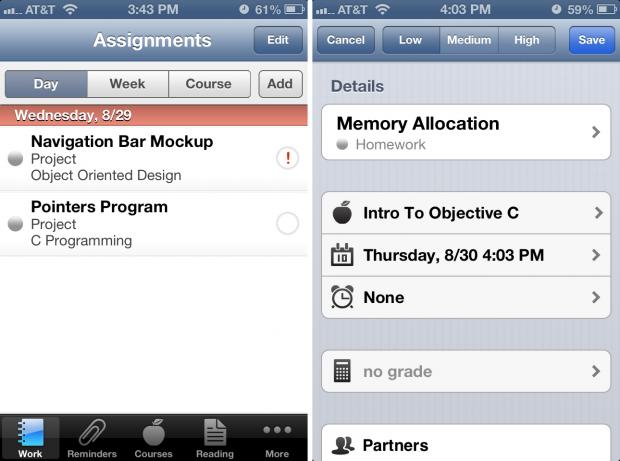
iHomework is better at organizing and sorting projects, reading assignments, and other types of tasks within the app. You can add any assignment or project to the work section while you can have other items such as reading tasks under the dedicated Reading tab. Reminders is also a separate section and a great place to put school (or non-school) related things so all your reminders are within one app. Things such as "Pick up a new pair of shoes after Chemistry" are perfect examples of things that iHomework can handle that don't really fit into apps like iStudiez Pro and Erudio.
To add an assignment in iHomework just choose add under the Work section. Fill in the name, choose the course, and then a notification setting. By default it will be set to none but you can choose between many options including minutes, hours, or days before. Once you've completed an assignment and earned a grade you can pop back in and add grades and mark it as complete. You can always see and edit completed assignments under the Completed section anytime.
When it comes to organizing and managing assignments, tasks, and notifications, iHomework provides the most flexibility and fine tuned control.
iStudiez Pro vs. Erudio vs. iHomework: Syncing and cross-platform support

iStudiez Pro is a universal download for both iPhone and iPad. They also offer a Mac counterpart as a separate purchase. iStudiez Pro syncs directly with iCloud so once you enable sync you're good to go and won't have to worry about whether or not your data is available on all your devices.
Erudio also has a Pro version for both iPhone and iPad but they'll be separate downloads. There is no Mac version so if you want access on your computer, you should probably rule out Erudio as an option. If you're only using iPhone and iPad, Erudio supports iCloud sync natively so all your assignments, courses, and projects will sync seamlessly between them with no effort on your part.
iHomework's app is a universal download for both iPhone and iPad and they also offer a Mac version that is available in the Mac App Store. As far as syncing goes, iHomework unfortunately only offers Wi-Fi sync while on the same network. While it's functional, it's nowhere near as convenient as native iCloud or private server syncing.
When it comes to syncing, iStudiez Pro is the only app that enjoys counterparts for both iPad and Mac as well as full iCloud syncing.
iStudiez Pro vs. Erudio vs. iHomework: Pricing

iStudiez Pro will only run you $0.99 and will work on both your iPhone and iPad without requiring a separate purchase. If you'd like the Mac version to complete the suite it'll cost an additional $9.99.
Erudio's premium app for iPhone will run you $2.99. If you'd like it for iPad you'll also have to fork over another $2.99 since it's not a universal binary. While there is iCloud syncing, there is currently no Mac version to add to the mix.
iHomework is currently priced at $0.99 in the iOS App Store and is a universal download for both iPhone and iPad. If you'd like to pick up the Mac version, it'll only cost you an additional $0.99 which is a great deal for any Mac app, let alone one with as many features as iHomework offers.
When it comes to cost, it's hard to beat iHomework's $0.99 price tag, especially because it's available for Mac and iOS.
iStudiez Pro vs. Erudio vs. iHomework: The bottom line

If you aren't concerned with syncing and only need a homework planner app on your iPhone, iHomework provides the best solution at the most reasonable price. Separate reading and reminders lists make iHomework the go-to iPhone app for staying on top of things. The only thing that keeps us from recommending iHomework as the best homework planner app is its lack of native iCloud syncing -- Wi-Fi sync is a pain.
Erudio does not offer a Mac app and the interface, although gorgeous, lagged during our tests. And then there's that pesky section number issue that can become annoying very quickly.
That leaves iStudiez Pro. If iCloud sync and cross-platform support are must haves for you, look no further than iStudiez Pro. It's got a huge list of features that'll keep you organized and set you up for success not only this school year but every year after that.
iStudiez Pro - $0.99 - Download Now
Erudio - $2.99 - Download Now
iHomework - $0.99 - Download Now


